

First things first: what exactly is a knowledgebase?
Think of it as your business brain in document form. Those FAQs you’ve answered a hundred times? Your product catalog? Your price list? Your “how to return items” policy? Your business operating hours. That’s your knowledgebase.
HabariChat learns from this brain. Here’s how to upload it:
What You Can Upload
- PDF files (brochures, catalogs, price lists)
- Word documents (training manuals, standard operating procedures)
- Excel sheets (inventory, service menus)
- Text files (FAQs, common responses)
The Upload Process
- Log in to your HabariChat dashboard and navigate to the knowledgebase.
- Click “Upload documents.” Select the files from your computer. You can upload multiple at once.
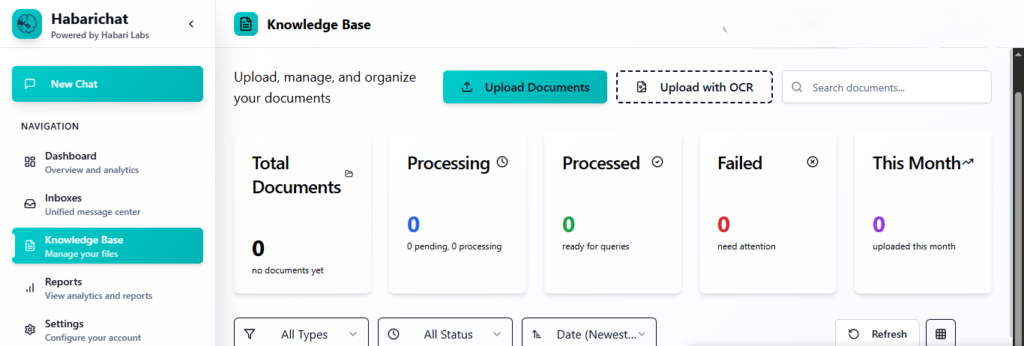
- Hit “Upload.” HabariChat will process the information. Depending on file size, this takes seconds to minutes.
- On the left menu, navigate to “New chat”, this is the interface that allows you to interact with the knowledgebase you have uploaded.
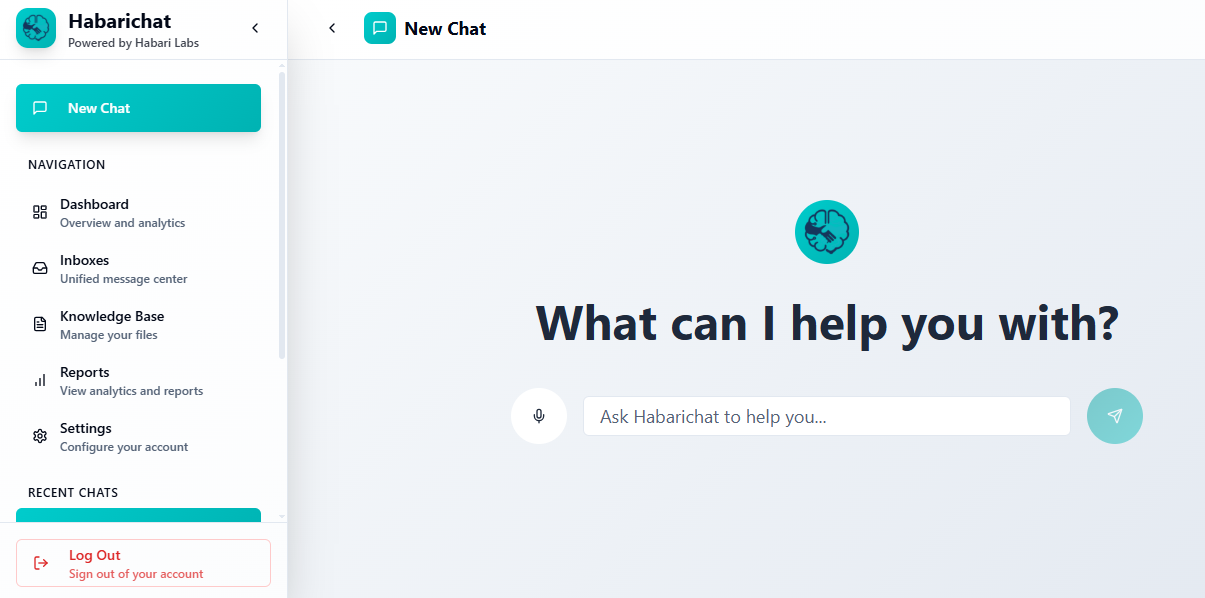
- Review and Test. Once uploaded, test with sample questions. Ask “How much does X cost?” and see if HabariChat pulls from your price list correctly.
Pro Tip: You don’t have to upload one document type. You can upload multiple documents as you keep advancing, and they can be of all types, e.g., a mixture of TXT, PDF, and doc.x.



One thought on “Getting Started: Set Up Your Knowledge Base in HabariChat.”